
AI Powered Job Matching
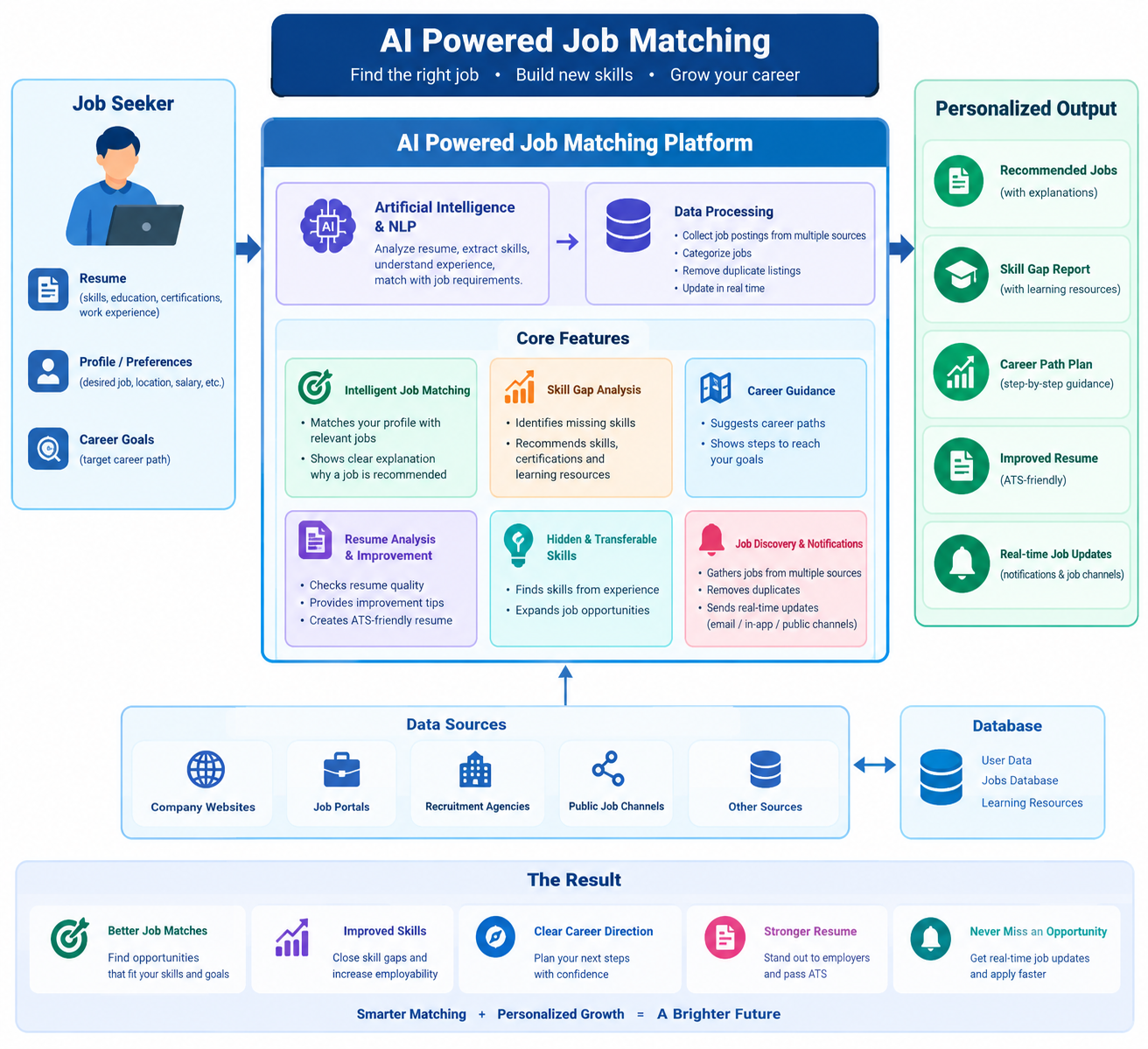
codeAI Job Matching System An Ethiopiafocused job discovery and CVmatching application. Job seekers can browse collected vacancies, upload a CV, review the profile extracted from it, and get ranked job recommendations with explanations. The repository contains a Next.js web app, a FastAPI backend, and a job collector. The features described below reflect the current implementation; this project does not currently include an employer portal or automated hiring decisions. What the system does For job seekers Create an account, sign in, reset a password, and update profile/contact details. Browse and search available jobs, with filters such as job field and location. Upload one PDF or DOCX CV. The upload page currently enforces a 10 MB limit in the browser. The system extracts text and matching signals such as skills, previous job titles, education, field, and experience. Review and correct extracted skills, field, experience, job titles, and education. Saving the profile recalculates recommendations. Get job recommendations ranked using CV/job signals. Match cards show fit details, score confidence, caveats, and skill gaps where available. Mark recommendations as relevant or not relevant; feedback can modestly influence similar future matches. Track job match statuses such as viewed, applied, or rejected, and view dashboard activity and notifications. Use additional career tools for resume analysis, career guidance, interview preparation, career transitions, learning plans, salary guidance, workplace preferences, and network insights. Optionally enable Telegram notifications. Telegram delivery requires server configuration and the user to connect with the bot. Recommendations are estimates based on the CV and job data available. They are not guarantees of eligibility, interview selection, or hiring. Job collection Collects public job posts from configured Telegram channels and the Ethiojobs data source. Cleans and classifies listings, then removes likely duplicates across sources using job text, title, company, and location signals. Keeps application links and combines source information where similar listings are merged. The collector runs hourly through the GitHub Actions workflow when configured, or can be run manually. A local Docker Compose configuration also has a collector service. The live Render Blueprint does not run a collector worker. To use the GitHub Actions workflow for a deployed database, configure the Actions secret with the database's external connection URL. Never put credentials in source control. What it does not currently do There is no employer portal, candidate screening dashboard, or employerside hiring workflow. The app does not submit applications to employers. It links users to the job's application destination and lets users update their own match status. Matching is based on the signals and data available in the CV and listings. Sentencetransformer embeddings are disabled by default; the default path uses structured signals and synonym/word matching. Collection and scraping depend on the upstream sources remaining available and may not include every vacancy. Architecture Component Technology Location Web app Next.js 14, React, TypeScript, Tailwind CSS API Python, FastAPI, SQLAlchemy Job collector Python source adapters, cleaning, classification, deduplication Database SQLite by default; PostgreSQL supported for deployment Backend configuration The backend exposes interactive API documentation at when it is running. Run locally Requirements Python 3.11 or later Node.js 18 or later and npm PostgreSQL is optional for local development (SQLite is the default) 1. Start the backend In PowerShell: On macOS/Linux, activate the virtual environment with instead. The backend reads configuration from environment variables and when present. The defaults use a local SQLite database. Check for API and database status, and for the API reference. 2. Start the frontend In another terminal: Create for the local API proxy: Open . The frontend's route proxies requests to the backend. 3. Run the job collector In a third terminal: The collector needs a pointing to the same database as the backend. To run continuously in the Docker Compose setup, use ; see the root for the configured services. Configuration Common backend settings include: Variable Purpose Database connection. Defaults to local SQLite. Secret used for signing authentication tokens. Set a strong, private value outside local development. Allowed browser origins when calling the API directly. Local directory for uploaded CV files. Optional bot credential for Telegram notifications. Optional embeddingbased matching switch. Defaults to to avoid heavy model memory use on small hosts. Developmentonly option to return password reset tokens when email delivery is not configured. Keep disabled in production. Do not commit files, database passwords, bot tokens, or other credentials. Deployment The repository includes a Render Blueprint in for the backend, frontend, and database. Create a Blueprint deployment from the repository and configure any required service secrets in the hosting provider. Uploaded CVs are written to the service filesystem by default. Ephemeral hosting filesystems can lose uploaded files after a restart or redeploy; use persistent storage or object storage before relying on CV uploads for production retention. Render free web services may sleep while idle, so initial requests can take longer during a cold start. Check to verify backend/database availability. API areas — account registration, login, current user, password reset — profile updates — CV upload, analysis, and profile review — browse and recommended jobs — CV matching, match status, dashboard statistics, and career tools — notifications and optional Telegram settings — user collaboration and invitation endpoints Tests and checks Backend tests: Frontend production build: Frontend tests, when applicable: Documentation Changelog — dated summary of shipped changes Interactive API documentation: while the backend is running. This generated API reference is the source of truth for current request/response schemas. Additional API notes (some endpoint examples may not reflect the latest implementation) System architecture AI model notes Contributing 1. Create a branch for your change. 2. Make and test the change. 3. Open a pull request with a clear description of behavior and validation. License There is currently no file in the repository. Add a license before redistributing the project under specific licensing terms.